In the world of increasing data volumes, the need to manage and govern information has significantly increased. Azure Purview, Microsoft’s comprehensive data governance solution is designed to meet this demand. Azure Purview allows organizations to oversee and manage their data, regardless of its location. With features like data discovery, classification, and policy definition, organizations can maintain data accuracy and compliance. This post dives into an in-depth view of Azure Purview, looking at its architecture and walking through a step-by-step configuration guide.
What Is Azure Purview?
Azure Purview is as a unified data governance solution, offering organizations a holistic view of their data landscape. This platform facilitates the discovery, classification, and management of data assets across different environments, including on-premises, multi-cloud, and software-as-a-service (SaaS) platforms.
By leveraging Azure Purview, organizations can:
Discover and inventory data assets
Understand relationships between data assets
Classify sensitive data
Define policies for governing data usage and compliance
Monitor and audit data usage
Azure Purview Architecture: Azure Purview sits on-top of various Azure services, including Azure Data Factory, Azure Synapse Analytics, and Azure Blob Storage. Its architecture is composed of three key components:
Azure Purview Studio: A web-based user interface which facilitates data asset management, data mapping, and policy definition.
Azure Purview Data Map: A graphical representation of the data landscape detailing relationships between data assets.
Azure Purview Data Catalog: A repository storing metadata about data assets, structure and usage.
Step-by-Step Configuration of Azure Purview:
Setting up Azure Purview is a streamlined process, achievable in a few steps:
Create an Azure Purview Account: Create an Azure Purview account through the Azure portal.
Configure Data Sources: Connect to various data sources (i.e., databases, file systems, SaaS applications) where data assets sit.
Create a Data Map: Utilize the Azure Purview Studio interface to create a representation of the data landscape and relationships between data assets.
Classify Data: Identify and label sensitive data using built-in classifiers for categories like PII, financial data, and healthcare information.
Define Policies: Establish rules governing data usage and compliance, specifying parameters such as authorized user access and any encryption requirements.
Monitor Data Usage: The final step involves actively monitoring data access and usage to ensure policy enforcement.
Azure Purview is a trailblazer for data governance solutions, providing a comprehensive understanding of your data landscape. Through features like discovery, classification, and management of data assets, you can guarantee data accuracy and compliance, regardless of where the data is located. Azure Purview can be an optimal choice for organizations seeking effective data management solutions.
Kubernetes is the favored option for developing cloud-native / containerized applications due to its scalability, portability, and availability. Additionally, it offers other benefits, including:
Automated Deployment and Scaling: Kubernetes provides the capability to automatically deploy and scale applications in response to demand.
Self-healing: Kubernetes has the ability to self-heal, ensuring your applications / services remain continuously available.
Load Balancing: Kubernetes distributes traffic among multiple containers, preventing any single container from becoming overloaded.
Storage Orchestration: Kubernetes manages persistent data by automatically mounting storage volumes to containers, simplifying data management.
Security: Kubernetes offers a range of security features, including Role-Based Access Control and network policies.
Multi-Cloud Support: Kubernetes is an ideal choice for organizations aiming for cloud-agnostic solutions, providing compatibility across different cloud environments.
Understand the Tooling
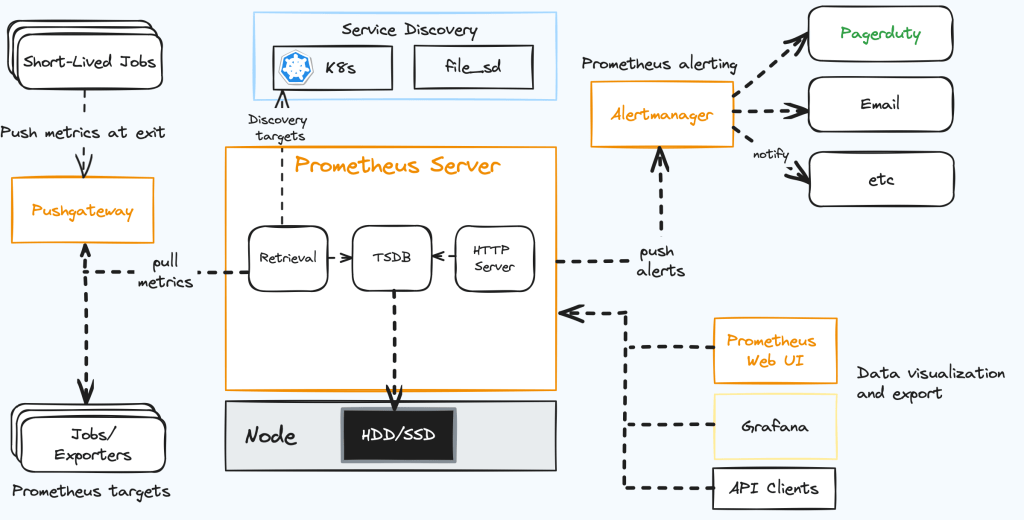
Prometheus is an open-source monitoring system (originally developed by SoundCloud), which is widely adopted for monitoring cloud-native applications due to its scalability, reliability, and user-friendliness.
Prometheus gathers metrics from multiple sources, including applications, services, and infrastructure components, and stores them in a time series database. This allows Prometheus to maintain a record of system performance.
Prometheus utilizes software programs known as exporters. These exporters collect metrics from various sources and provide them to Prometheus. When new exporter are detected, Prometheus initiates the collection of metrics from that source, storing them in its database. Further configuration options enable Prometheus to scrape metrics from specific endpoints.
Scalability: Prometheus is crafted for scalability, making it suitable for monitoring multiple systems.
Reliability: Prometheus is recognized for its reliability.
User-Friendliness: Prometheus is known for its ease of use and straightforward configuration.
Open Source: Being an open-source project, Prometheus is freely available for use and can be modified to meet specific requirements.
Prerequisites
You will need an Azure account, the Azure CLI, Kubectl and Helm.
You can install the latest versions of Kubectl and Helm using the Azure CLI or install them manually.
Install the CLI tools on your local machine since you will need to forward a local port to access both the Prometheus and Grafana web interfaces.
Create an Azure Kubernetes Service (AKS) Cluster
Sign into the Azure CLI by running the login command.
az login
Install or update kubectl.
az aks install-cli
Create two bash variables which we will use in subsequent commands. (You may need to change the syntax below if you are using another shell.)
RESOURCE_GROUP=aks-prometheus
AKS_NAME=aks1
Create a resource group. I have chosen to create this in the eastus2 Azure region.
az group create --name $RESOURCE_GROUP --location eastus2
Create a new AKS cluster using the az aks create command. Here we create a 3-node cluster using the B-series Burstable VM type which is cost-effective and suitable for this test.
az aks create --resource-group $RESOURCE_GROUP \
  --name $AKS_NAME \
  --node-count 3 \
  --node-vm-size Standard_B2s \
  --generate-ssh-keys
Authenticate to the cluster we have just created.
az aks get-credentials \
  --resource-group $RESOURCE_GROUP \
  --name $AKS_NAME
We can now access our Kubernetes cluster with kubectl. Use kubectl to see the nodes we have just created.
kubectl get nodes
Install Grafana and Prometheus
Prometheus can be installed through the official operator or by leveraging Helm. I’ll use the Helm chart.
Add its repository to our repository list and update it.
Access http://localhost:9090 via your web browser and access the user interface to examine the raw metrics within Prometheus.
The default username for Grafana is admin and the default password is prom-operator (You can change it in the Grafana UI later).
Note: For security reasons, you should avoid exposing your Prometheus or Grafana endpoints to the public internet using a Service or Ingress.
Since AKS operates as a managed Kubernetes service, it restricts access to internal components like the etcd store, the controller manager, the scheduler, etc. Attempting to pull metrics from these components within the cluster is not necessary. Therefore, I am disabling this option by upgrading our Prometheus release.
This ensures that resources are not wasted in attempting to retrieve its metrics.
Note: In the case of running an outdated Kubernetes version, you may need to deactivate the HTTPS metrics served from the kubelet as they are exposed over HTTP. To do this, you will need to set the kubelet.serviceMonitor.https parameter in the helm chart to false.
The contemporary digital landscape is abuzz with the concept of being ‘Cloud Native.’ What exactly does this term entail, and why is it gaining so much significance? Let’s delve into the essence of cloud-native application architecture, with Microsoft Azure serving as our guiding beacon.
At its essence, a cloud-native application is meticulously crafted to operate seamlessly within a cloud environment, leveraging its inherent advantages in scalability, resilience, and agility. It doesn’t merely exist in the cloud; it flourishes there. These applications are constructed using cutting-edge services and architectures such as microservices, containers, serverless functions, and immutable infrastructure.
Key Features of Cloud Native Applications
Microservices: Decomposes applications into small, independent services, each serving a distinct function.
Containers: Lightweight, standalone software packages that encapsulate all the elements required for an application to run.
Serverless Computing: Executes code in response to events without the need for server management, allowing developers to concentrate solely on the code.
Immutable Infrastructure: Once deployed, resources remain unaltered, ensuring consistency in environments.
Declarative APIs: Enables a descriptive configuration, focusing on “what” rather than “how.”
Scalability: Adapts to varying workloads by scaling horizontally rather than vertically.
Resilient: Equipped with built-in redundancy and fault-tolerance mechanisms, cloud-native apps can gracefully handle failures.
Pros and Cons of Cloud Native Applications
Pros:
Flexibility: Easily adapts to changing conditions or requirements.
Speed: Swift deployment and updates facilitated by modern CI/CD pipelines.
Efficiency: Optimal resource utilization leads to cost savings.
Scalability: Capable of handling growing user bases or traffic spikes.
Resilience: Minimized downtime, even in the face of system component failures.
Cons:
Complexity: Managing multiple services, particularly in a microservices architecture, can be intricate.
Learning Curve: Requires a departure from traditional development practices and mindsets.
Potential Cost Surprises: Lack of monitoring can result in unforeseen expenses.
Vendor Lock-in: While promoting flexibility, certain services may tie users to a specific cloud provider.
Azure as a Cloud Native Solution
Microsoft Azure stands as an exemplary embodiment of the potential of cloud-native solutions.
Example Solution:
Let’s conceptualize a cloud-native e-commerce application on Azure.
Web Frontend: Utilize Azure Web Apps for hosting the e-commerce website, providing automatic scaling and CDN integration.
API Layer: Dissect backend services into microservices, each running in its dedicated Azure Kubernetes Service (AKS) cluster.
Serverless Functions: Employ Azure Functions for tasks like sending notification emails or processing payments, paying only for consumed computation time.
Data Storage: Leverage Cosmos DB for product catalogs, offering global distribution and multimodel support. Azure SQL Database suits relational data.
Caching: Ensure fast page loads and reduced database calls using Azure Redis Cache.
Event Messaging: Manage microservices communication via events using Azure Event Grid.
CI/CD: Ensure continuous integration and deployment with Azure DevOps, guaranteeing swift and reliable updates.
Conclusion
Cloud-native application architecture isn’t just a trend; it represents the evolution of software development tailored for the cloud era. Despite challenges, platforms like Azure provide an extensive range of services for effectively implementing a cloud-native strategy. As businesses aim to innovate and scale, embracing the cloud-native paradigm is not a choice but a necessity.
As an increasing number of organizations migrate their infrastructure and applications to the cloud, the demand for secure and dependable connectivity between on-premises networks and cloud resources becomes more crucial. Addressing this need, Azure VPN Gateway emerges as a pivotal solution. Positioned as a fully managed service within Microsoft Azure, Azure VPN Gateway facilitates secure site-to-site or remote access VPN connections to Azure virtual networks.
Designed to seamlessly integrate with other Azure networking services such as Azure Virtual Network, Azure ExpressRoute, and Azure VPN Client, Azure VPN Gateway facilitates the creation of hybrid networking solutions that seamlessly span both on-premises and cloud environments.
A standout feature of Azure VPN Gateway lies in its capacity to establish secure site-to-site connectivity. This functionality empowers the connection of on-premises networks to Azure virtual networks over the internet, establishing a secure and private network link. The gateway supports a variety of VPN protocols, including Internet Protocol Security (IPsec) and Secure Sockets Layer (SSL), providing the flexibility to choose the protocol that best suits specific needs.
Moreover, Azure VPN Gateway extends its utility to remote access VPN connectivity, enabling organizations to securely link remote users and devices to Azure virtual networks. This proves particularly valuable for enterprises with a remote or mobile workforce, granting them secure access to cloud resources from any location globally.
Scalability is another significant advantage of Azure VPN Gateway. The service can be easily scaled up or down as required, offering the flexibility to adjust capacity according to changing business demands. This scalability proves especially beneficial for organizations facing fluctuating demand, allowing them to optimize infrastructure usage and associated costs.
Beyond its fundamental capabilities, Azure VPN Gateway boasts advanced features such as support for multiple virtual network gateways, active-active high availability, and Border Gateway Protocol (BGP) routing. These features empower organizations to craft intricate networking solutions tailored to meet their specific requirements.
Embarking on the Azure VPN Gateway journey requires an Azure subscription and the establishment of an Azure virtual network. Once the virtual network is set up, creating and configuring a VPN gateway can be achieved through the Azure portal, Azure PowerShell, or Azure CLI. Microsoft offers comprehensive documentation and step-by-step tutorials to facilitate a swift and straightforward initiation.
A crucial component within the Azure landscape is the Local Network Gateway. Serving as a representation of the local network infrastructure seeking connection to an Azure virtual network, it acts as a bridge, ensuring secure and private communication between on-premises and Azure environments. Comparable to a router or VPN device in the on-premises network, the Local Network Gateway typically possesses a public IP address that Azure utilizes to establish a secure site-to-site VPN connection. Configuration involves specifying the public IP address of the on-premises device serving as the VPN endpoint, along with local network settings such as IP address range and subnet mask.
In summary, Azure VPN Gateway emerges as a robust and adaptable networking service, fostering secure and reliable connectivity between on-premises networks and Azure resources. With its support for both site-to-site and remote access VPN connectivity, scalability, and advanced features, Azure VPN Gateway stands as an indispensable tool for organizations seeking to construct hybrid networking solutions bridging on-premises and cloud environments seamlessly.